 |
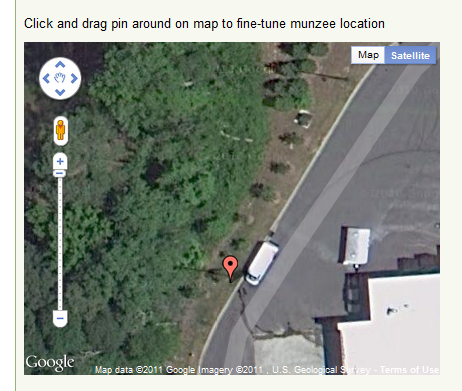
| To change your Munzee Coords simply move the red pointer. |
http://headhardhat-geocache.blogspot.com/2011/07/enjoying-my-munzee-madness.html
One of the things that I have started hearing about Munzee hides is the inaccuracy of the coords when placed. I kind of suspected that would be an issue because people forget to let the smartphone just sit for a minute or three and settle. What happens is your Munzee card is shows up way over there. Sometimes several hundred feet way over there and it is really right where you placed it. How can you correct when this happens?
GeoCache: I'm NOT Obsessed... Right?
http://headhardhat-geocache.blogspot.com/
-------------------------------------------------------
Twitter me at
@headhardhat
Friend me at Facebook
http://www.facebook.com/HeadHardHat/
Google+
http://gplus.to/headhardhat
Please don't forget to visit our GeoSnippits Geocaching Tutorial Videos Website at
http://www.geosnippits.com
Great question. Even with our best efforts of leaving the phone sit for a few minutes before scanning the Munzee card things like tree cover and other interference can cause the GPS to be off. The Munzee website has a really simple solution. Log in to www.Munzee.com and click on the smallish 'User Home' link at the top of the page. When it loads you will see another link towards the top middle called 'Deployed Munzees', click it. You will then be shown a list of all the Munzee hides you have placed. Choose the one you want to adjust.
This opens up all the information and description you will want to put about that particular Munzee. Towards the bottom is a map that has a red pin showing where Munzee thinks you hid your card. Below the map is the coords that were uploaded when you scanned the card initially. At the top right of the map click the Satellite button. Now zoom in all the way you can and you will see a really great shot of the area you hid the Munzee card and where the red pointer thinks it is. To adjust, simply move the red pointer from where it is to where you want it to be. The coords automatically readjust to where you put it. When you have the pointer where you want it don't forget to click the 'Update Munzee Details' button to save everything.
Once done, the update is automatic and anyone searching your Munzee hide will now have a much better chance of finding it.
After seeing this I went to each of my hides and made the correct adjustments. It made a big difference on a couple. Hope this helps!
-HHH
GeoCache: I'm NOT Obsessed... Right?
http://headhardhat-geocache.blogspot.com/
-------------------------------------------------------
Twitter me at
@headhardhat
Friend me at Facebook
http://www.facebook.com/HeadHardHat/
Google+
http://gplus.to/headhardhat
Please don't forget to visit our GeoSnippits Geocaching Tutorial Videos Website at
http://www.geosnippits.com


